What happens to river turbidity after heavy rain?
Built a Google Earth Engine analysis linking monthly rainfall patterns with satellite-derived turbidity, turning raw imagery into a repeatable way to flag potential siltation zones before they become a problem.
Highlights
What this assessment was designed to answer and how it's structured.
Objective
- Map spatial turbidity patterns and detect siltation hotspots.
- Track changes through time: seasonality and anomalies.
- Produce clear maps and summaries for interpretation.
Approach
- Assemble imagery collection and apply QA masking.
- Compute turbidity proxy (NDTI) and aggregate per period.
- Summarize trends and create monthly and seasonal maps.
Tools
- Google Earth Engine for cloud-scale imagery processing.
- QGIS / ArcGIS for cartographic outputs as needed.
- Python for post-processing and time-series plotting.
My Role
- Designed the workflow and quality-control approach.
- Implemented index extraction and map outputs in GEE.
- Produced interpretation-ready visuals for reporting.
Key Takeaways
- Monthly composites reduce noise and significantly improve spatial interpretability.
- Rigorous QA/QC (cloud and shadow masking) is critical for defensible results.
- Map and trend summary combinations communicate findings effectively to non-technical audiences.
Data Assembly & QA
Build the multi-year image collection and apply masking to remove noise and improve signal quality before index computation.
- Select imagery source and define the analysis time range.
- Apply cloud, shadow, and water masking appropriate to the sensor.
- Standardize band naming and resolve spatial resolution handling.
- Obtain rainfall data from the nearest weather station

Index Computation
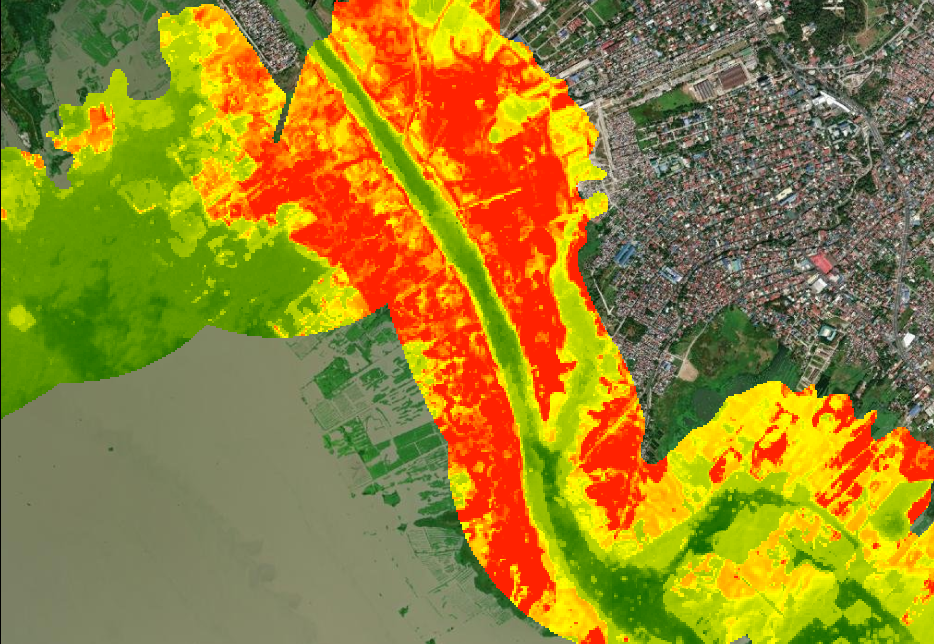
Compute the turbidity proxy index (NDTI) per scene and generate temporal composites for spatial and statistical analysis.
- Calculate NDTI per scene and harmonize outputs across the time series.
- Create monthly and seasonal composites to reduce noise.
- Extract zonal statistics for areas of interest and river segments.
Rainfall Analysis
Examine monthly and seasonal rainfall patterns to contextualize turbidity variability and identify precipitation-driven siltation signals.
- Extract and aggregate rainfall data across the study period.
- Identify seasonal patterns, anomalies, and high-intensity events.
- Cross-reference rainfall peaks with turbidity spikes to infer drivers.
Outputs & Interpretation
Deliver hotspot maps, time-series summaries, and export-ready figures that support interpretation and reporting.
- Hotspot maps and change detection summaries highlighting siltation risk zones.
- Time-series plots showing monthly and seasonal turbidity trends.
- Export maps and summary tables formatted for reporting packs.
Sample Output Summary
| Parameter | Result | Interpretation |
|---|---|---|
| Wettest Month | August | Peak rainfall drives maximum runoff. |
| Maximum Monthly Rainfall | 420 mm | Indicates strong monsoon influence. |
| Average Turbidity (Dry Season) | 6–12 NDTI | Background sediment levels. |
| Average Turbidity (Wet Season) | 18–32 NDTI | Elevated sediment transport. |
| Turbidity Hotspot Zones | Lower river bends & tributary confluences | Likely areas of erosion or sediment deposition. |
Data Privacy Note
This case study is generalized and displays only public, synthetic, or sanitized examples. No client-confidential information is included.